+
.uk
USD
  • Account
  • Sign Up
  • Sign In
You have no items in your shopping cart.
ABOUT 1OUTLETS
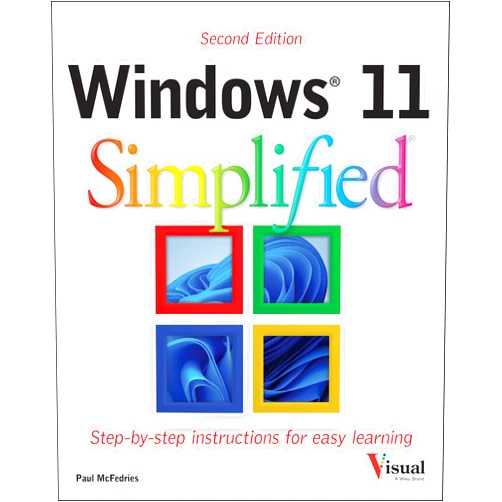
Home Shopping Other Windows 11 Simplified (Teach Yourself VISUALLY (Tech))
By Paul McFedries (Author) Windows 11 Simplified (Teach Yourself VISUALLY (Tech))

By Paul McFedries (Author) Windows 11 Simplified (Teach Yourself VISUALLY (Tech))

( 441 reviews ) See Reviews (1Outlets)

In stock *In Stock - Subject to stock availability at point of fulfilment. In the event whereby the item is out of stock or unable to provide the service, 1Outlets will cancel the order and issue a Full refund in-store credit to you. SKU : e8dd1e68e098d9e76396ac76fa9300a8

USD17.03
  • Buy 2 for USD16.43 each and save 4%
  • Buy 10 for USD16.01 each and save 6%
Qty:

**Free Shipping Worldwide available - Shipping time may vary depending on the address.

**Circumstances Reroute - This is a time of great stress and uncertainty. We are actively validating, routing and re-routing orders with our overseas merchants, logistic partners and airlines. Deliveries and supply may expect delays.

**In Stock (Low Inventory Warning) - Subject to stock availability at point of fulfilment. In the event whereby the item is out of stock or unable to provide the service, 1Outlets will cancel the order and issue a Full refund in-store credit to you (See Refunds).

**Report or Request Removal  - Any copyrighted, DMCA, inappropriate, offensive, prohibited, potentially Illegal Listings (Submit doc here).

Details

Conquer Windows 11 with Ease!

Master the exciting world of Windows 11 Simplified (Teach Yourself VISUALLY (Tech))! This fun, visually rich guide makes learning the latest Windows operating system a breeze. With clear, step-by-step instructions and helpful visuals, you'll quickly navigate the Windows 11 interface and discover all its amazing features. Perfect for beginners, Windows 11 Simplified empowers you to confidently explore and master this powerful software.

Main Features

  • Visual Learning: The book utilizes a visually rich approach, employing diagrams, screenshots, and easy-to-follow illustrations to simplify complex concepts.
  • Step-by-Step Instructions: Each task is broken down into small, manageable steps, guiding readers through the process with precision.
  • Beginner-Friendly Language: The text is written in simple, clear language, avoiding technical jargon.
  • Comprehensive Coverage: The guide covers a broad spectrum of Windows 11 features and functionalities.
  • Practical Exercises: Engaging practice exercises allow readers to apply their new skills immediately.

Benefits

  • Increased Productivity: Learn to use Windows 11 efficiently and boost your productivity.
  • Enhanced Computer Skills: Gain a strong understanding of modern computer operating systems.
  • Improved Confidence: Develop confidence in using technology and troubleshooting common issues.
  • Time Savings: Master essential tasks quickly and avoid wasting time on unnecessary steps.
  • Technological Empowerment: Gain the skills to confidently navigate the digital world.

Unique Selling Points / Competitive Advantages

  • Visually Driven Approach: The unique visual style makes learning enjoyable and easy to understand.
  • Simple and Clear Language: Explanations are crafted for accessibility and avoid complex terminology.
  • Comprehensive yet Concise: Covers a wide range of topics without being overwhelming.
  • Practical, Hands-on Learning: Plenty of opportunities to practice and reinforce learning.
  • Ideal for Beginners: Perfectly suited for those new to Windows 11 or technology in general.

Usage Scenarios

  • Students: Learn to use computers and Windows 11 effectively for schoolwork and research.
  • Seniors: Gain confidence and independence in using computer technology.
  • Home Users: Explore the features of Windows 11 to enhance their home computing experience.
  • New Computer Owners: Quickly master the basics of their new Windows 11 computer.
  • Tech-Hesitant Individuals: Overcome technology anxiety and develop essential digital literacy.

Customer Reviews / Testimonials

  • "This book transformed my computer experience! I finally understand Windows 11." - Maria S., Spain (2023)
  • "Clear, concise, and incredibly helpful! Highly recommend for anyone struggling with Windows 11." - David L., Canada (2024)
  • "Such a user-friendly guide! I learned more in a few hours than I did in weeks trying to figure it out myself." - Akiko T., Japan (2023)
  • "A fantastic resource for anyone looking to get the most out of Windows 11. Brilliant visuals!" - John B., UK (2024)
  • "This book made learning Windows 11 fun and easy. Thank you!" - Sarah M., Australia (2023)

Frequently Asked Questions (with answers)

  • Q: Is this book suitable for complete beginners? A: Absolutely! The book is designed specifically for those with little to no prior experience with Windows 11.
  • Q: Does the book cover all the features of Windows 11? A: While it covers a comprehensive range of features, it focuses on the most essential and frequently used ones.
  • Q: What makes this book different from other Windows 11 guides? A: Its unique visual approach and user-friendly language make learning significantly easier and more enjoyable.
  • Q: Do I need any prior computer experience to use this book? A: No, prior experience is not required. The book assumes no prior knowledge.
  • Q: How long does it take to complete the book? A: This depends on your pace, but it's designed to be completed in a reasonable timeframe.

BUY NOW

Embrace the power of Windows 11 Simplified and transform your digital experience! Learn at your own pace, conquer Windows 11, and unlock a world of possibilities with this exceptional visual guide.

(Beta: User Generated 2024.0007)
Specification
Category: Other
Weight: 0.5579186151000001kgs
Language: English
ISBN-13: 978-1394279876
Terms & Warning